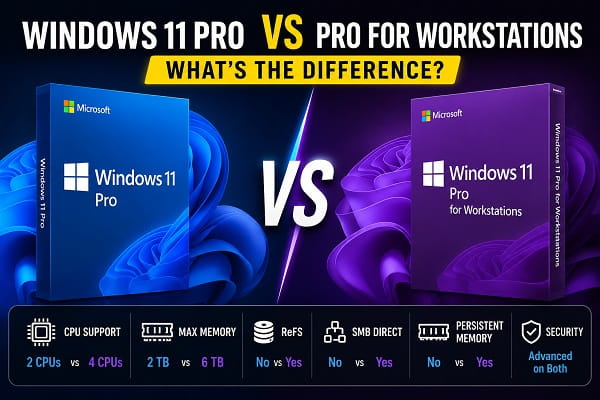
Choosing the right edition of Windows 11 isn’t always straightforward. While most people are familiar with Windows 11 Home and Windows 11 Pro, there’s another edition called Windows 11 Pro for Workstations that offers additional features designed for professional users and high-performance computers.
At first glance, both editions appear very similar. They share the same interface, security features, productivity tools, and Windows experience. However, Windows 11 Pro for Workstations includes several advanced technologies that are specifically designed for powerful desktop computers, engineering workstations, scientific computing, AI development, large databases, and other demanding workloads.
If you’re buying a new PC, upgrading Windows, or wondering whether the extra features are worth paying for, understanding the differences can help you make the right decision.
This guide compares Windows 11 Pro and Windows 11 Pro for Workstations in detail, explains what each feature does, and helps you decide which edition is best for your needs.
What Is Windows 11 Pro?
Windows 11 Pro is Microsoft’s professional edition designed for business users, remote workers, developers, students, and power users who need more features than Windows 11 Home.
It includes everything available in Windows 11 Home plus additional capabilities such as:
- BitLocker Drive Encryption
- Remote Desktop
- Hyper-V virtualization
- Windows Sandbox
- Group Policy Editor
- Domain Join
- Azure Active Directory support
- Advanced security controls
For most people, Windows 11 Pro offers more than enough features for everyday work and productivity.
If you’re planning a clean installation before upgrading to Windows 11 Pro or Pro for Workstations, How to Reinstall Windows 11 (Step-by-Step Guide) explains the safest installation methods while preserving your personal files whenever possible.
What Is Windows 11 Pro for Workstations?
Windows 11 Pro for Workstations is an enhanced version of Windows 11 Pro built specifically for high-end computers with powerful hardware.
It includes every feature found in Windows 11 Pro while adding technologies that improve reliability, performance, and support for enterprise-grade hardware.
This edition is intended for professionals who work with:
- 3D rendering
- CAD software
- Video production
- Machine learning
- Artificial intelligence
- Scientific simulations
- Engineering applications
- Large databases
- Professional virtualization
If your computer has workstation-class hardware, this edition can unlock additional performance benefits.
Windows 11 Pro vs Pro for Workstations: Quick Comparison
| Feature | Windows 11 Pro | Pro for Workstations |
|---|---|---|
| BitLocker | ✅ | ✅ |
| Hyper-V | ✅ | ✅ |
| Remote Desktop | ✅ | ✅ |
| Group Policy | ✅ | ✅ |
| Windows Sandbox | ✅ | ✅ |
| ReFS Support | ❌ | ✅ |
| SMB Direct | ❌ | ✅ |
| Persistent Memory | ❌ | ✅ |
| Maximum CPUs | 2 | 4 |
| Maximum RAM | 2 TB | 6 TB |
| Target Users | Professionals & Businesses | Engineers & High-End Workstations |
Windows 11 Pro vs Pro for Workstations: Which One Should You Choose?
Choosing the right edition depends on how you use your computer. While Windows 11 Pro is the best option for most people, Windows 11 Pro for Workstations is designed for users with specialized hardware and demanding professional workloads.
Choose Windows 11 Pro if You’re a Home or Office User
Windows 11 Pro is the better choice if you:
- Use your PC for web browsing, email, and everyday productivity.
- Work with Microsoft Office or other business applications.
- Attend online meetings and work remotely.
- Want advanced security features like BitLocker and Remote Desktop.
- Need a reliable operating system without paying for enterprise-only features.
For the vast majority of users, Windows 11 Pro offers everything needed for work, study, and personal use.
Choose Windows 11 Pro if You’re a Gamer or Developer
Windows 11 Pro is also ideal if you:
- Play modern PC games.
- Develop software using Visual Studio or other IDEs.
- Use Windows Subsystem for Linux (WSL).
- Run Docker or Hyper-V virtual machines.
- Test applications in Windows Sandbox.
- Want the best balance between performance, features, and price.
Most developers and gamers won’t benefit from the workstation-exclusive features.
Choose Windows 11 Pro for Workstations if You’re a Professional Creator
Windows 11 Pro for Workstations is the better option if you:
- Edit large 4K or 8K video projects.
- Create complex 3D models and animations.
- Work with professional photography workflows.
- Produce visual effects or motion graphics.
- Handle massive multimedia files every day.
Its advanced hardware support makes it better suited for demanding creative workloads.
Choose Windows 11 Pro for Workstations if You Use Enterprise Hardware
Upgrading to workstation-class processors or other enterprise hardware may require changing firmware settings before installation. How to Open BIOS in Windows 11 (Step-by-Step Guide) explains the different methods for accessing your computer’s BIOS or UEFI settings.
Windows 11 Pro for Workstations is designed for users who:
- Use Intel Xeon or AMD Threadripper processors.
- Need support for more than 2 TB of RAM.
- Run AI or machine learning workloads.
- Manage enterprise databases.
- Use professional CAD or engineering software.
- Require ReFS for improved data resilience.
- Benefit from SMB Direct for high-speed networking.
- Work with workstation-class hardware every day.
If your work depends on enterprise-grade performance and reliability, the additional features in Windows 11 Pro for Workstations can justify the extra cost. Otherwise, Windows 11 Pro remains the better value for most users.
Feature-by-Feature Comparison
Regardless of which edition you choose, removing unnecessary apps and startup processes can improve overall responsiveness. How to Debloat Windows 11 Safely (Step-by-Step Guide) shows how to optimize Windows without affecting important system features.
1. Memory Support
One of the biggest differences is the amount of memory each edition supports.
Windows 11 Pro
- Supports up to 2 TB RAM
Windows 11 Pro for Workstations
- Supports up to 6 TB RAM
While most users will never install this much memory, large engineering firms, research labs, and enterprise servers often require significantly more RAM for specialized workloads.
2. CPU Support
Windows 11 Pro supports powerful processors, but Pro for Workstations goes even further.
Windows 11 Pro
- Supports up to 2 physical CPUs
Windows 11 Pro for Workstations
- Supports up to 4 physical CPUs
This matters primarily for enterprise workstations rather than consumer desktops.
3. ReFS (Resilient File System)
One exclusive feature is ReFS.
ReFS is Microsoft’s advanced file system designed to:
- Protect data integrity
- Handle extremely large storage volumes
- Reduce corruption
- Improve reliability
Professionals working with massive datasets benefit the most from this technology.
4. SMB Direct
Another workstation-exclusive feature is SMB Direct.
It uses Remote Direct Memory Access (RDMA) network adapters to:
- Increase file transfer speeds
- Reduce CPU usage
- Improve network performance
- Lower latency
This is particularly useful in enterprise environments with high-speed storage servers.
5. Persistent Memory Support
Windows 11 Pro for Workstations supports Persistent Memory (NVDIMM).
Unlike traditional RAM, persistent memory retains data even after power is removed.
Benefits include:
- Faster application startup
- Reduced downtime
- Improved database performance
- Faster access to frequently used data
Most consumer PCs don’t include this hardware, so the feature isn’t relevant for the average user.
6. Performance
For everyday computing, both editions deliver virtually identical performance.
However, Windows 11 Pro for Workstations is optimized for systems equipped with enterprise-grade processors, large amounts of memory, and high-speed storage devices.
It performs better when handling:
- Complex engineering projects.
- Scientific simulations.
- Large virtual machines.
- Massive databases.
- AI model training.
- Professional rendering software.
If you primarily browse the web, stream videos, use Microsoft Office, or play games, you probably won’t notice any performance difference.
7. Security Features
Security is another area where both editions are very similar.
Both Windows 11 Pro and Pro for Workstations include:
- BitLocker Drive Encryption.
- Windows Defender Antivirus.
- Windows Hello.
- Secure Boot.
- Microsoft Defender Firewall.
- Windows Security.
- Device Encryption.
- Credential Guard (supported hardware).
- Virtualization-Based Security (VBS).
For most users, the security experience is essentially identical.
8. Virtualization
If you regularly run virtual machines, both editions include:
- Hyper-V.
- Windows Sandbox.
- Windows Subsystem for Linux (WSL).
- Windows Subsystem for Android (where supported).
Developers and IT professionals can comfortably use either edition.
The main advantage of Pro for Workstations comes from its support for significantly more CPU cores and memory, allowing you to run larger virtual environments.
Developers and IT professionals sometimes need to install specialized or unsigned hardware drivers for testing environments. If Windows blocks those drivers, How to Disable Driver Signature Enforcement in Windows 11 explains how to install trusted unsigned drivers safely.
9. Networking
Networking capabilities differ mainly in professional environments.
Windows 11 Pro for Workstations includes SMB Direct, enabling extremely fast file transfers when used with compatible RDMA hardware.
Benefits include:
- Lower latency.
- Reduced CPU usage.
- Faster network storage access.
- Improved reliability.
For home users connected to a standard Wi-Fi router, this feature provides little to no benefit.
Windows 11 Pro vs Pro for Workstations for Gaming
If you’re buying Windows for gaming, Windows 11 Pro is the better choice.
Although Pro for Workstations supports more powerful hardware, games generally don’t benefit from workstation-exclusive technologies like:
- ReFS.
- SMB Direct.
- Persistent Memory.
- Support for four physical CPUs.
Gaming performance depends far more on:
- Your graphics card.
- Processor.
- RAM.
- SSD speed.
With identical hardware, gaming performance is essentially the same on both editions.
Which Is Better for Video Editing?
Professional video editors working with:
- 8K footage.
- RAW video.
- Large media libraries.
- Multi-camera projects.
may benefit from Windows 11 Pro for Workstations when paired with workstation-class hardware.
However, creators using software like Adobe Premiere Pro, DaVinci Resolve, or Final Cut alternatives on a typical desktop will find Windows 11 Pro more than sufficient.
Which Is Better for Programming?
For software developers, Windows 11 Pro is usually the better value.
It already includes:
- Hyper-V.
- WSL.
- Docker compatibility.
- Remote Desktop.
- Windows Sandbox.
- BitLocker.
Only developers working with extremely large virtual environments or enterprise hardware are likely to benefit from Pro for Workstations.
Which Is Better for CAD, Engineering, and AI?
This is where Windows 11 Pro for Workstations shines.
It’s designed for professionals using applications such as:
- AutoCAD.
- SolidWorks.
- Autodesk Inventor.
- MATLAB.
- TensorFlow.
- PyTorch.
- ANSYS.
- Blender for large rendering workloads.
Combined with Xeon or Threadripper processors, ECC memory, and enterprise storage, the workstation edition offers greater scalability and reliability.
Should You Upgrade to Pro for Workstations?
For most users, the answer is no.
Upgrade only if you:
- Own workstation-class hardware.
- Need more than 2 TB of RAM.
- Use multiple physical CPUs.
- Work with enterprise storage systems.
- Require ReFS or SMB Direct.
- Run demanding professional workloads.
Otherwise, Windows 11 Pro provides virtually the same experience at a lower cost.
Frequently Asked Questions
Does Windows 11 Pro for Workstations fix Windows problems?
No. Both editions are built on the same Windows 11 core, so common issues such as taskbar errors, Windows Update problems, or driver conflicts can still occur. If your taskbar becomes unresponsive, Windows 11 Taskbar Not Working? 12 Fixes That Work walks you through several proven solutions.
Is Windows 11 Pro for Workstations faster?
Not for everyday tasks. The performance improvements are noticeable only on high-end workstation hardware running demanding professional applications.
Can I game on Windows 11 Pro for Workstations?
Yes. Games run normally, but you won’t gain additional FPS simply by using the workstation edition.
Does Windows 11 Pro for Workstations include everything in Windows 11 Pro?
Yes. It includes every Windows 11 Pro feature plus additional workstation-specific capabilities.
Is Windows 11 Pro for Workstations worth it?
Only if your computer uses enterprise-grade hardware or you perform resource-intensive work such as engineering, scientific computing, AI development, or professional rendering.
Can I upgrade from Windows 11 Pro to Pro for Workstations?
Yes. Microsoft allows upgrades to the workstation edition through a valid license.
Which edition should most people choose?
For home users, students, gamers, programmers, office workers, and small businesses, Windows 11 Pro is the recommended choice because it includes all the essential professional features without the additional cost of workstation-only capabilities.
If you’re choosing between Windows 11 Pro and Windows 11 Pro for Workstations, your hardware and workload should guide your decision. For the vast majority of users, Windows 11 Pro delivers all the performance, security, and productivity features they’ll ever need. Pro for Workstations becomes worthwhile only when you’re using specialized hardware and software that can take advantage of its advanced capabilities. If you aren’t working with enterprise-grade systems, sticking with Windows 11 Pro is usually the smarter and more cost-effective option.
